Self-Service Kiosk Modules: What to Specify
Quick answer: Almost every self-service kiosk is assembled from the same eight module families — display and touch, computing platform, card and identity readers, barcode and QR scanners, printers, payment and cash handling, cameras and biometrics, plus the enclosure, power and connectivity that hold it together. Which ones you need is decided by the transaction, not by the catalogue.
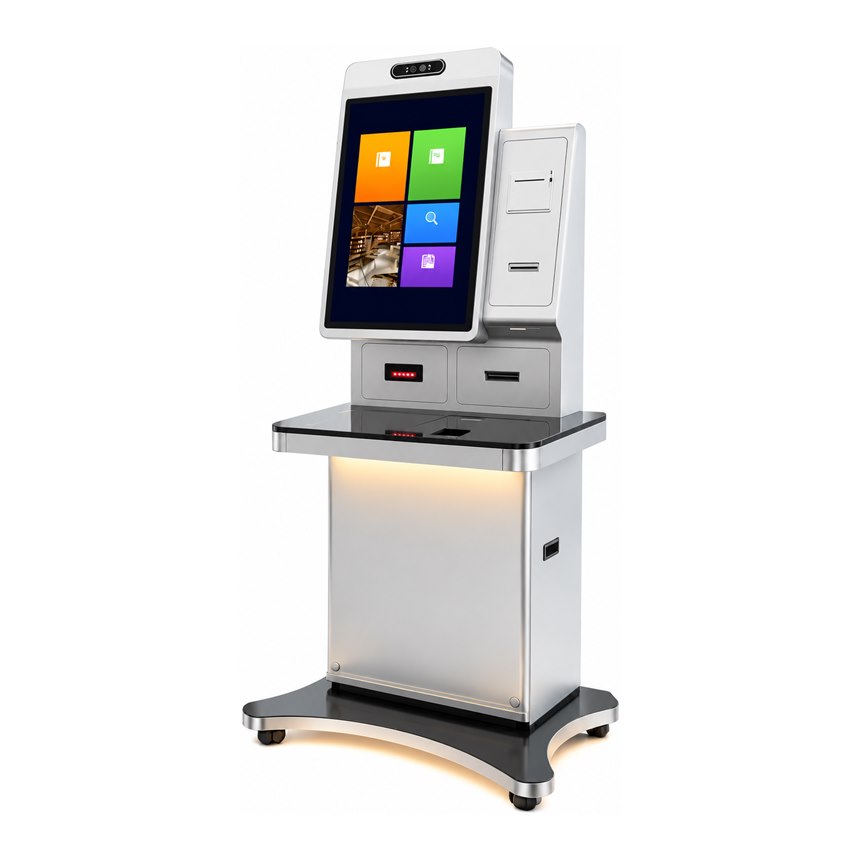
A kiosk quotation is mostly a list of modules. Two units can look identical from the outside and differ by a factor of three in cost, simply because one carries a certified card reader and a cash recycler while the other only needs a QR scanner and a receipt printer. Knowing what each module does — and what it obliges you to maintain — is the fastest way to keep a project inside budget.
The eight module families
The table below is the map for the rest of this guide. Use it as a checklist when you write an RFQ: mark each family as required, optional or not applicable before you ask anyone for a price.
| Family | What does the work a customer cannot do on a screen |
|---|---|
| Typical options | Contact IC, contactless RFID, magnetic stripe, national ID, passport MRZ, 1D/2D imager, thermal or A4 printer, PIN pad, bill acceptor, coin hopper, cash recycler, camera, fingerprint, NFC |
| Chosen by | The transaction: what the customer must present, prove, pay with, or take away |
| Watch out for | Driver support on your operating system, power budget, service access, certification in the destination market |
1. Card and identity reading
This is the family most projects underestimate, because "card reader" covers six different devices. A contact IC reader handles bank and CPU cards inserted into a slot. A contactless RFID reader (13.56 MHz, ISO 14443 A/B, MIFARE) handles tap cards, staff badges and transport cards. A magnetic stripe reader handles older bank and membership cards. An ID reader at 125 kHz handles proximity cards used for building access. A national ID reader reads the chip on a resident identity card, which is mandatory for hospital, telecom and government self-service in several markets. A passport MRZ scanner reads the two-line code at the bottom of a passport page for border, hotel and immigration counters.
The practical constraint is never whether the reader exists — it is whether it has a driver for the operating system you intend to run, and whether its certification is valid in the country where the unit will be installed. Confirm both in writing before the cabinet is tooled.
2. Barcode and QR scanning
A 1D laser engine reads printed linear barcodes: tickets, printed vouchers, product labels. A 2D imager reads both linear codes and matrix codes, and it is the only option if customers will present a QR code on a phone screen — mobile wallet payment, e-tickets, loyalty codes, health codes. Because phone screens are backlit and often cracked or dimmed, a 2D engine needs adequate illumination and a scan window angled so the screen faces the imager rather than the ceiling.
Two mounting styles dominate. A presentation window behind tempered glass — the scan deck — is the robust choice for public counters because there is no protruding hardware to break. A flush-mounted engine in the bezel saves space on wall-mounted and countertop units. Both are read by the same 2D engine; the difference is how much abuse the installation will take.
3. Printing
An 80 mm thermal receipt printer with an auto-cutter is the default for payment, queue tickets and transaction records; 58 mm is used where the receipt is short and paper cost matters. An A4 laser printer is specified when the customer must leave with a document — a medical record, a statement, a certificate, a boarding pass on paper. Parking and cinema installations often use a dedicated ticket printer with a larger roll and a different media path.
Specify three things that are easy to forget: roll capacity, whether the printer loads from the front or the rear, and whether a paper-near-end sensor is wired to the management software. In the field, a kiosk that runs out of paper without warning is a kiosk that is out of service.
4. Computing platform and operating system
Two platform families cover most builds. Android boards such as the RK3568 and RK3399, with 2–8 GB of RAM and 16–64 GB of eMMC storage, suit single-purpose applications, digital signage hybrids and cost-sensitive deployments. Windows and Linux builds on Intel Celeron J6412, optionally Core i3 or i5, with 4–16 GB of DDR memory and 64–512 GB of SSD storage, suit legacy peripherals, heavy browser applications and anything that needs a specific Windows driver.
Choose the platform last, not first. It is a consequence of the modules you selected: if the ID reader only has a Windows driver, the platform decision has already been made for you. Request kiosk-mode lock-down, a hardware watchdog and remote device management, so the unit recovers from a frozen application without a site visit.
5. Display and touch
Sizes run from 15.6-inch countertop panels to 32-inch floor-standing displays. A 32-inch portrait panel at 2560 × 1440 gives enough vertical space for a full registration form plus a guidance column, which is why it has become the reference size for multi-step workflows. Smaller panels at 1920 × 1080 remain the right choice for wall-mounted and desktop units.
Touch is projected capacitive (PCAP) with ten points in nearly all current designs, under tempered or anti-glare glass. Where a PIN is entered, ask for a privacy filter. Where the screen faces a window, ask for higher brightness and optical bonding. A second display mounted above the main screen costs little and is used for queue guidance, advertising or showing the operator's side of the transaction on dual-screen counters.
6. Payment and cash handling
Card payment splits into three approaches. A card reader integrated into the cabinet handles the card and sends the transaction to a payment gateway. A certified PIN pad handles the encrypted PIN entry, which is what banks and most regulated markets require. A bracket for an external POS terminal lets the acquirer supply and certify their own device — slower to integrate, but it removes certification risk from the kiosk builder.
QR payment is cheaper than card payment because it can work by displaying a code for the customer to scan, or by scanning the code the customer shows. Cash handling is the most expensive family: a bill acceptor, a coin hopper and a cash recycler each add weight, a reconciliation routine, a cash collection schedule and a service contract. Model the cost of cash collection before you specify it.
7. Cameras and biometrics
A camera above the display serves face capture for KYC, membership enrolment, access control and anti-fraud records. A fingerprint module serves the same purposes where a fingerprint is the established credential. Both raise data questions before they raise technical ones: where images are stored, how long they are retained, and which regulation applies. Settle that with your compliance owner before the module is ordered.
8. Enclosure, power and connectivity
The cabinet is a module too. A floor-standing base with lockable castors lets one unit be moved for cleaning and repositioned between seasons; a fixed base is more stable and slightly cheaper. Countertop and wall-mounted cabinets serve the same applications where floor space is scarce. Powder-coated steel is the default; a higher ingress rating, sealed cable entries and a filtered ventilation path are required for semi-outdoor and industrial sites.
Power and network planning belongs in the same conversation: Ethernet as primary, Wi-Fi or 4G where cabling is impractical, and a small UPS so a power cut produces a graceful shutdown and a completed transaction record rather than a corrupted database.
Module sets by scenario
The table below shows the sets we most often build. Treat it as a starting point: these are the combinations that survive contact with real queues.
| Hospital registration and payment | National ID reader, IC and bank card reader, 1D/2D scanner for referral codes, 80 mm receipt printer, optional A4 printer for records, second display for queue guidance. See the hospital registration and payment kiosk and the dual-screen hospital kiosk. |
|---|---|
| Parking payment | 1D/2D scanner for tickets and mobile codes, bank card reader with PIN pad, bill acceptor and coin hopper, 80 mm receipt printer, high-brightness display for covered car parks. See the parking payment terminal. |
| Bank and financial self-service | Certified PIN pad, contact IC and magnetic stripe reader, 2D scanner, A4 statement printer, privacy filter, camera for audit records. See the financial self-service terminal and the card reader service kiosk. |
| Hotel, cinema and venue | Passport or ID reader, 2D scanner for e-tickets, ticket or receipt printer, camera for enrolment, second display for wayfinding. The 32-inch multi-industry terminal covers these five applications in one cabinet. |
| Supermarket self-checkout | 2D scanner with a large scan deck, bank card reader, 80 mm receipt printer, scale interface, bagging area detection. |
| Government and social security | National ID reader, IC card reader, 2D scanner, A4 printer for certificates, camera, signature or fingerprint capture. See the social security kiosk and the dual-screen government affairs terminal. |
| Border and immigration | Passport MRZ scanner, national ID reader, camera with liveness detection, fingerprint module, 2D scanner, receipt printer. |
| Clinic card dispensing | Card dispenser with a stack, national ID reader, 2D scanner, receipt printer, small footprint cabinet. See the clinic card dispenser kiosk. |
Five questions to settle before you order
- Which operating system will your application run on? Every module must have a driver for it. This single answer decides the computing platform, the board and much of the cost.
- What is the power budget and the cable path? Cash modules, A4 printers and heated enclosures are the loads that break an undersized supply.
- How is the unit serviced? Front access lets a wall unit stay on the wall; rear access is cheaper but needs clearance. Decide who refills paper and how long that takes.
- Which certifications must the payment and identity modules carry? Card, PIN and identity modules are regulated differently in each market, and certification belongs to a specific module model, not to the cabinet.
- What should happen when a transaction fails? Define the recovery flow, the on-screen message and the remote alert before the software is written, not after the first complaint.
What to send with your module RFQ
An RFQ that lists modules with interfaces and quantities gets a comparable quotation; one that says "kiosk with card reader" does not. Include the target operating system, the module list with preferred interface (USB, RS232, TTL), the daily transaction volume, the installation environment, the certification markets, the expected service access and the quantity at first order and at full rollout.
Working on a module list right now?
Send the workflow you need and the modules you think you need, and we will reply with the ones that are missing, the ones that are redundant, and the driver constraints we can see.
Request a module quotation Browse kiosk models